Hot Games

Startup

Tech

Showing posts with label tech. Show all posts

ROM Phone ARK Benefit M7 - ROM Android 5.1

Posted on Saturday, June 25, 2016 with No comments
  • Title: ARK Benefit M7
ARK Benefit M7: ROM Phone ARK Benefit M7 - ROM Android 5.1
Update Official ROM ARK Benefit...

DESCRIPTION


ROM Phone ARK Benefit M7 - ROM Android 5.1
ONLY MT6735M
ROM 2 - Update Official ROM ARK Benefit M7 Version: Benefit_M7_HWV2_V004_160531_1914 – ALPS.L1.MP3.V1_LENTEK6735M.65U.L_P44  LMY47D
Install flash or FOTA
ATTENTION i don't know if this ROM is compatible with ROM 1
——————————————————————————————————————————————————————————
ROM 2 - Update Official ROM ARK Benefit M7 Version: Benefit_M7_HWV2_V003_151222_1800 – ALPS.L1.MP3.V1_LENTEK6735M.65U.L_P44  LMY47D
Install flash or FOTA
ATTENTION i don't know if this ROM is compatible with ROM 1
——————————————————————————————————————————————————————————
ROM 2 - Official ROM ARK Benefit M7 Version: Benefit_M7_HWV2_V002_151216_2100 – ALPS.L1.MP3.V1_LENTEK6735M.65U.L_P44  LMY47D
Install flash or FOTA
ATTENTION i don't know if this ROM is compatible with ROM 1 ( I think another motherboard )
——————————————————————————————————————————————————————————
ROM 1 – Update Official ROM ARK Benefit M7 Version: Benefit_M7_V008_20152910 – ALPS.L1.MP3.V1_LENTEK6735M.65U.L_P12 – LMY47D
Install flash or FOTA
——————————————————————————————————————————————————————————
ROM 1 – Update Official ROM ARK Benefit M7 Version: Benefit_M7_V008 – ALPS.L1.MP3.V1_LENTEK6735M.65U.L_P12 – LMY47D
Install flash or FOTA
——————————————————————————————————————————————————————————
ROM 1 – Update Official ROM ARK Benefit M7 Version: Benefit_M7_V007 – ALPS.L1.MP3.V1_LENTEK6735M.65U.L_P12 – LMY47D
Install flash or FOTA
——————————————————————————————————————————————————————————
ROM 1 – Update Official ROM ARK Benefit M7 Version: Benefit_M7_V006 – ALPS.L1.MP3.V1_LENTEK6735M.65U.L_P12 – LMY47D
Install flash or FOTA
——————————————————————————————————————————————————————————
ROM 1 – Update Official ROM ARK Benefit M7 Version: Benefit_M7_V005 – ALPS.L1.MP3.V1_LENTEK6735M.65U.L_P12 – LMY47D
Install flash or FOTA
——————————————————————————————————————————————————————————
ROM 1 – Update Official ROM ARK Benefit M7 Version: Benefit_M7_V004 – ALPS.L1.MP3.V1_LENTEK6735M.65U.L_P12 – LMY47D
Install flash
——————————————————————————————————————————————————————————
ROM 1 – Update Official ROM ARK Benefit M7 Version: Benefit_M7_V003 – ALPS.L1.MP3.V1_LENTEK6735M.65U.L_P12 – LMY47D
Install flash
——————————————————————————————————————————————————————————
ROM 1 – Update Official ROM ARK Benefit M7 Version: Benefit_M7_V002 – ALPS.L1.MP3.V1_LENTEK6735M.65U.L_P12 – LMY47D
Install flash or FOTA
——————————————————————————————————————————————————————————
ROM 1 – Official ROM ARK Benefit M7 Version: Benefit_M7_V001 – ALPS.L1.MP3.V1_LENTEK6735M.65U.L_P12 – LMY47D
Gapps include – No Rooted
Language support : Multilang

Install ROM:
- Unpack FlashTools, and Click on Flash_tool.exe
- Select "scatter-Loading" and search MT6735_Android_scatter.txt in ROM
- Wait file to be added into Flash Tool
- Select "Download Only" or if upgrade "Firmware upgrade"
- Turn off your phone, remove the battery (if the battery is removable) and replace it after some seconds (and don't turn on the phone).
- Press “Download” button to start
- and connect your phone into the computer via USB data cable.
- The process will start and a red progress bar will appear after color purple, yellow.
- And green circles display
- Finish !
- You can now safely disconnect your phone and turn it on.
READ MORE

Tutorial Para Restableser de fabrica

Posted on Wednesday, March 2, 2016 with No comments

Tutorial Para Restableser de fabrica


Antes De Empesar El Tutorial Dejen me Desirles Que Este Ejercicio No Nos Tomara Mas De 10 Minutos En Realizarlo 


Tutorial Para  Restableser de fabrica  (Hard Reset) O  Tan bien Nos Sirve Para Quitar Contraseñas O Patrón De Contraseña,O Algunas Beses Nuestra Table o Smartfon Esta Lento,la pila Rápidamente se Descarga De Tantas Aplicaciones  Que se Executan En Segundo Plano Y No Nos Damos Cuenta.

Tan bien Nos Puede Serbir Para Cuando Nuestra Tablet O Smartfon Al Encender Se Queda Trabado En El Logo Android O En El Logo De La Empresa O Marca De Su Tablet O Smartfon

Nota Se Recomienda Tener Por Lo Menos El 80%De La  Batería Cargada,  Hacer Una Copia De Seguridad A Los archivos Importantes  Por que se borrarán
todo Lo que instalemos o descarguemos  a nuestra tablet, que dará con las mismas aplicaciones como si la acabáramos de comprar


Modo Fácil ( Novatos)

Para Los Dispositivos Que  No Tienen Ningún problema He Inician  Normalmente Pero Que se siente Que se  Alenta o Que La Pila Te Dura Un Poco Menos De Lo Normal. esto sucede Por Tantas Aplicaciones O Alguna De Las Aplicaciones  Esta Probocando Este O Varios Problemas, O Se Están Ejecutando En Segundo Plano Y No Tedas Cuenta.Sigue Estos Pasos Muy Simples,Recuerda  Respaldar Tus Archivos Inportates.

1. Ve al menú Ajustes, y selecciona “Configuración de la Privacidad”. Una vez ahí, busca "restablecer los datos de fábrica".

En algunos dispositivos aparece otra opción para borrar la Tarjeta SD (esta opción depende del fabricante y la versión de Android).

2. Cuando aceptes el reset, se borrará toda la partición del disco, datos y caché y al término del proceso, el dispositivo automática mente se reiniciará.

Algo que no debe preocuparte es  perder la información en tu tarjeta SD, ya que esta se mantiene  intacta al igual que la carpeta sistema (siempre y cuando no hayas seleccionado en el menú la opción de borrar SD). Por tanto el teléfono quedará tal y como venía de fábrica.es desir Como Cuando lo Compraste.


Modo Avanzado


Este Método Es Para Cuando Nuestro Dispositivo  Se Quedo Trabado O Simplemente No Inicia,Recuerden Cargar La Batería De Su Dispositivo Por Lo Menos Un 80% Y Tan bien Nos Servirá Para Quitar la Contraseña O Si Se A quedado Bloqueado Y Se te Ha Olvidado La Contraseña

Primero Antes De Empesar Les Explicare El Significado De Los 3 Pasos Que Vamos A Realisar

1-reboot system now: Reinicio Normal

2- Wipe Data/Factory Reset: Se borrarán todos sus datos personales y el sistema volverá al estado original de fabrica (Hard Restet)

3- Wipe Cache Partition:  A través de esta opción borramos la memoria caché. En el caché encontramos los archivos de uso más frecuente para un acceso rápido, Historial De Navegacion. No se borrarán los datos personales.

Ahora Si Vamos Con La Tablet

En Algunos Dispositivos Nos Podrán Aparecer Algunas Diferencias En El Menú Del Recovery Pero No Se Preocupen El Procedimiento Sera El Mismo Por Eso Estaré Utilizando Diferente Imagenes De Diferente Dispositivos Una Recopilacion De Imagenes De Google


Nota Para Entrar Al Modo Recovery En  Nuestro Dispositivo Android Se Requiere Un Patrón De Teclas Es Desir Un Conjunto De Botones  o Presionando 2 O 3 Botones Alá Bes Eso Es Dependiendo El Dispositivo Que tengan Puede Ser Yo Utilizar El Mas Habitual Tan bien Pueden Consultarlo En Google

Ejemplo 1
Presionando El Vol + El Botón De Power Al Mismo Tiempo  Hastas Que Aparesca El Menú

Ejemplo  2
Presionando El Vol - El Botón De Power Al Mismo Tiempo  Hastas Que Aparesca El Menú

Ejemplo  3
Presionando El Vol + El Botón De Home Al Mismo Tiempo  Hastas Que Aparesca El Menú

Ejemplo 4
Presionando El Vol - El Botón De Home Al Mismo Tiempo  Hastas Que Aparesca El Menú

Ya Dicho Esto Sigamos


 1 Una Bes Que Nuestra Tablet Este  Cargada Por lo Menos Un 80%

2 Apagamos La Tablet Totalmente,Presionando El Botón Power Y Le Damos En Apagar Hasta
Que Este Totalmente Apagada

3 Con Nuestra Tablet Apagada Presionamos El Botón Vol+ y El Botón De Power Al Mismo Tiempo
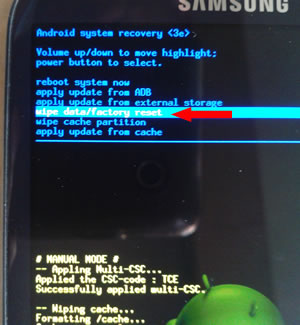
Hasta Que Entremos En Modo Recovery De Nuestra Terminal Android,Y Nos Apare sera En La Pantalla Un Menú Como Este


4 Con La Tecla Subir O Vajar Volumen Se Desplazan Por El Menú Y  Se Posicionan En Wipe Partition Cache Y Con El Botón  De Power Damos Enter


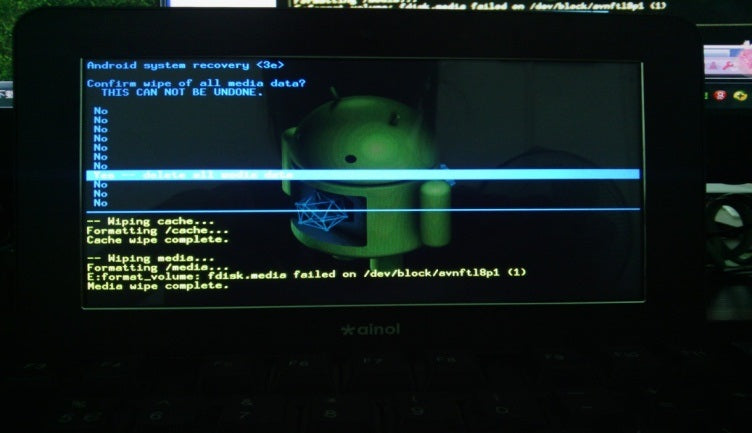
5 Y nos Aparesera Este Menú Y Con Las Teclas De Volumen Nos Desplazamos Hasta Donde Dise
yes-delete all media data Y Damos Enter Con El Botón De Power, Y Esperamos Aque Terminé El Proceso


6 Una Bes Que  El Proceso Termine Los Llevara Al Menú Principal Y Nos Desplazamos Nuevamente Con  Las Teclas De Volume Wipe Data/ Factory Reset Y Damos Enter Con La Tecla
De Power


7 Y De Nuevo Nos Llevara A Este Menú Y Nos Desplazamos Hasta Donde Dise
yes-delete all media data Y Damos Enter Con El Botón De Power, Y Esperamos Aque Termine
 El Proceso


8 Una Bes Que Termine El Proceso Nos Regresara Al Menú Principal Y Elegimos
Reboot System Now Y Damos Enter Con La Tecla De Power Y Nuestro Dispositivo Se Reiniciara


9 Recuerden Que Al Reiniciarse Tardara Un poco Mas De Lo Debido Por que Iniciara Como Si Fuera De Fabrica Igual Que Cuando Lo Compramos Así Es que Tengan Paciencia


Bueno Espero Y Les Sea De Gran Ayuda

Recuerden Si Tienen Algún Problema Aganlo Saber En Los Comentarios


READ MORE

Get a New iPhone 6 Now! ONLY IN iNDIA

Posted on Thursday, February 18, 2016 with No comments
READ MORE

how to unlock your iDevice from iCloud Activation Lock

Posted on Wednesday, February 17, 2016 with No comments
We offer a method how to unlock your iDevice from iCloud Activation Lock. Method works with all devices - iPad/iPod/iPhone. http://www.icloudbypass.club


READ MORE

Bent u één van de eerste met de nieuwste Apple iPhone 6?

Posted on with No comments

De iPhone 6S komt ook uit in de kleur Rose Gold!
Wil jij jouw vriendin verrassen en een iPhone 6S Rosé Gold winnen!
Like, deel & tag jou vriendin in een reactie en je maakt automatisch kans om een Apple iPhone 6S Rose gold te winnen!


READ MORE

Samsung Galaxy S4 Firmwares GT-I9500 (Exynos octa)

Posted on Monday, February 8, 2016 with No comments


Download now   Phone Model: GT-I9500   Build date: 30/05/2013   Version: 4.2.2   PDA: ME5   Region: CHN(China)
READ MORE

Samsung Galaxy S4 Firmwares GT-I9505 (snapdragon)

Posted on with No comments


Download now   Phone Model: GT-i9505   Build date: 27/11/2013   Version: 4.3   PDA: MKF   Region: NEE (Nordic)
Download now   Phone Model: GT-I9505   Build date: 13/10/2013   Version: 4.3   PDA: MJ5   Region: DBT(Germany)
Download now   Phone Model: GT-I9505   Build date: 29/05/2013   Version: 4.2.2   PDA: MEA   Region: DBT(Germany)
Download now   Phone Model: GT-I9505   Build date: 14/05/2013   Version: 4.2.2   PDA: ME3   Region: TGY(Hong Kong)
Download now   Phone Model: GT-I9505   Build date: 02/05/2013   Version: 4.2.2   PDA: ME2   Region: NEE(Nordic)
Download now   Phone Model: GT-I9505   Build date: 02/05/2013   Version: 4.2.2   PDA: ME2   Region: XEO(Poland)
Download now   Phone Model: GT-I9505   Build date: 26/04/2013   Version: 4.2.2   PDA: MDN   Region: PHE(Spain)
Download now   Phone Model: GT-I9505   Build date: 26/04/2013   Version: 4.2.2   PDA: MDM   Region: ZTO(Brazil)
Download now   Phone Model: GT-I9505   Build date: 26/04/2013   Version: 4.2.2   PDA: MDN   Region: XEF(France)
Download now   Phone Model: GT-I9505   Build date: 25/04/2013   Version: 4.2.2   PDA: MDM   Region: EUR(Greece)
Download now   Phone Model: GT-I9505   Build date: 25/04/2013   Version: 4.2.2   PDA: MDM   Region: XTE(Philippines)
Download now   Phone Model: GT-I9505   Build date: 25/04/2013   Version: 4.2.2   PDA: MDM   Region: ITV(Italy)
Download now   Phone Model: GT-I9505   Build date: 25/04/2013   Version: 4.2.2   PDA: MDM   Region: DBT(Germany)
Download now   Phone Model: GT-I9505   Build date: 25/04/2013   Version: 4.2.2   PDA: MDM   Region: BTU(United Kingdom)
READ MORE

Samsung Galaxy S3

Posted on with No comments
READ MORE
...